REPORTING & AUDIT
Stop Reconstructing Approvals. Start Proving Them.
Your auditor asks who authorized the Hendricks vendor payment. Email gives you fragments. ApproveThis gives you the complete, immutable record — timestamped, exportable, defensible.
No credit card required. All features from $19/mo.
AUDIT TRAIL
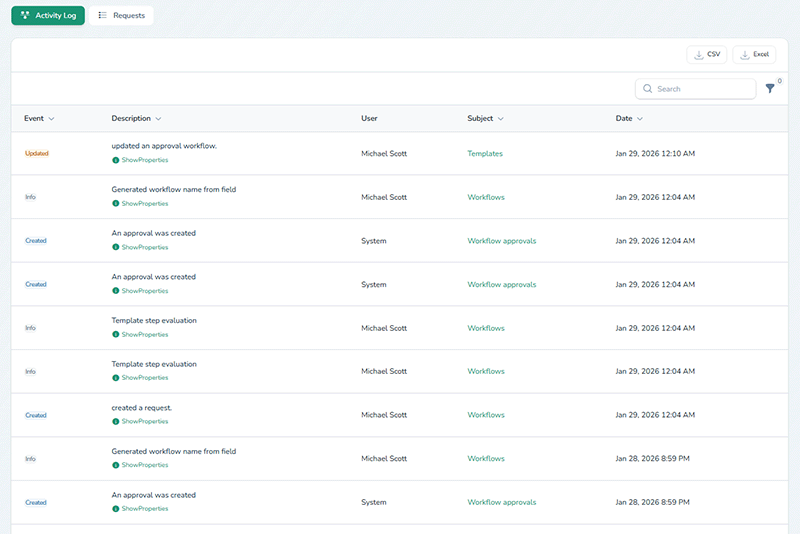
Every Action. Every User. Every Timestamp. Permanent.
Your audit trail is the record. Complete, unalterable, written the moment each action occurs.
The moment an action occurs, it is written to the audit trail and locked. No edits. No deletions. No gaps.
What the audit trail captures:
- Submissions — who submitted, when, what was included
- Approval decisions — who approved or denied, with timestamps and comments
- Edits — every field change with before-and-after values
- Comments — threaded discussion with user attribution
- Status changes — every transition logged
- External approver actions — same detail as internal users, account or not
This is not a summary. It is the evidence.
Every external action is captured with user identity, timestamp, and action detail — even without an account.
EXPORT & EVIDENCE
Produce the Record. In the Format They Need.
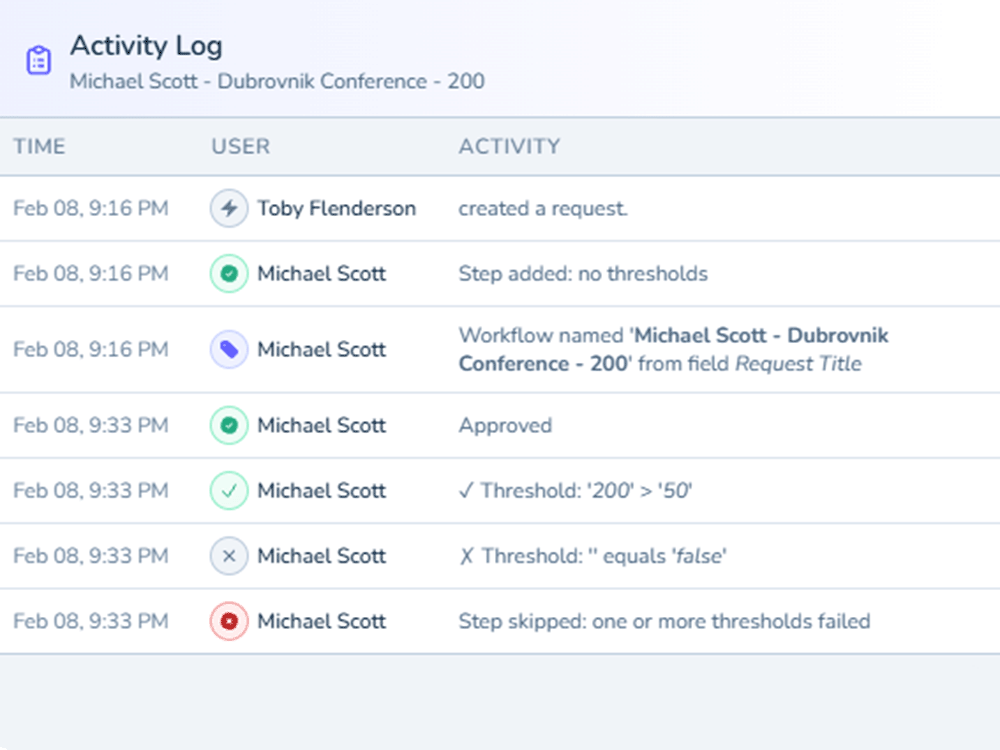
Auditors need PDF. Legal needs Excel. The evidence is the same. The format changes in two clicks.
When the auditor asks, the answer is a complete export — already assembled, formatted, defensible.
Export to PDF: Full approval chain, every timestamp, every user, every action. Formatted for regulatory submission and legal discovery.
Export to Excel: Up to 10,000 rows. Filter by workflow, date range, status, or approver. Sortable, searchable, ready for downstream reporting.
Use cases:
- Complete PO approval history for your auditor
- Vendor authorization records for a procurement dispute
- Board documentation of spend authorization
- Evidence file for regulatory review or legal discovery
Exports include external approver actions — the same record, whether the approver is internal or external.
ANALYTICS
See Where Approvals Stall — and Why
Your approval process has a bottleneck. You suspect who. Now you can prove it.
Analytics provides real-time visibility into approval performance across every workflow, approver, and step.
What you can measure:
- Average approval time by workflow, step, approver, or date range
- Approval rates — which workflows get denied most, and at which step
- Bottleneck identification — which approver or step consistently delays decisions
- Individual performance — response times and decision patterns
- Anomaly detection — off-hours approvals, volume spikes, atypical patterns
Interactive charts. Drill-down by any dimension. Refresh every 60 seconds.
This is policy enforcement, not surveillance. Inconsistent application of approval policy is a compliance risk that’s invisible without data. The analytics surface the pattern. Your team decides what to do about it.
Analytics data covers the most recent 24 months. Export to PDF or Excel for long-term archiving.
DASHBOARD VIEWS
Your Approval Status. Three Views. Zero Guesswork.
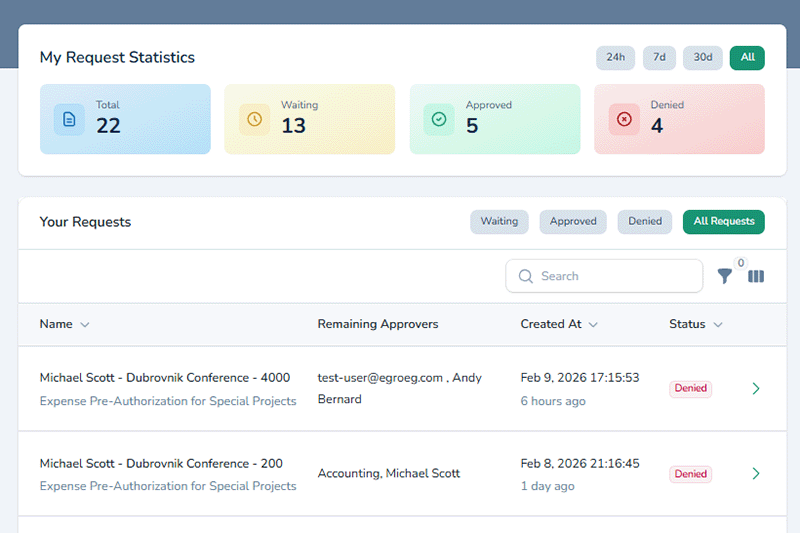
Reporting is not just what you export at quarter-end. It is what you see every morning at 8 AM.
Table View
Every request in a sortable, filterable table. Full-text search across titles, descriptions, comments, and metadata. Tag by project, department, or priority to organize reporting across any dimension.
Kanban View
Drag-and-drop board grouped by status: Pending, In Review, Approved, Rejected. Scan the columns, identify holdups, and know what needs attention before the first meeting of the day.
Calendar View
Interactive calendar for date-based requests — vacation approvals, contract renewals, campaign launch dates. Date range requests span multiple days for accurate scheduling visibility.
VERSION HISTORY
Track What Changed — Not Just What Was Decided
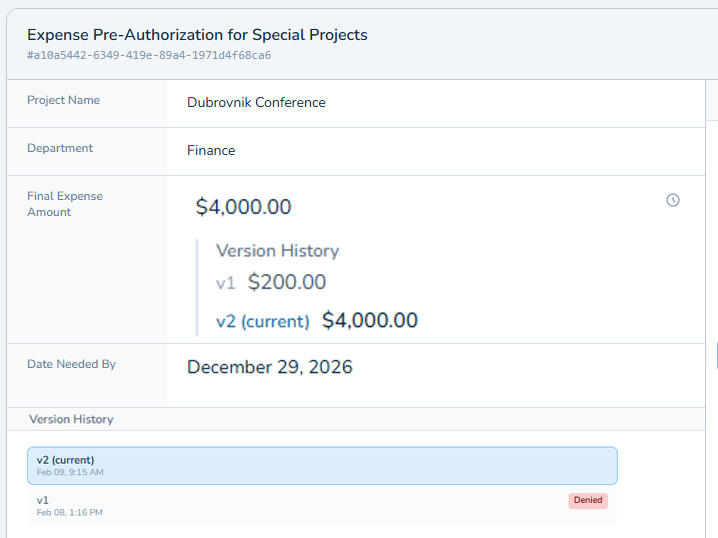
The dashboard tells you what was decided. Version history tells you what changed along the way.
A vendor contract was submitted, denied with redline comments, revised, resubmitted, and approved. Three months later, someone asks what changed between version one and the final approval.
With ApproveThis, every revision is captured:
- Side-by-side comparison — version diffs between any two versions
- Full attribution — who made each change, and when
- Rollback capability — restore a previous version if needed
- Complete timeline — every version from submission through final approval
For compliance teams: Contract redlines across multiple revision cycles are documented with version diffs — not reconstructed from email attachments.
For client-facing teams: The revision timeline proves what the client saw at each stage, and when they signed off.
Version history retained 2 years on Professional, unlimited on Enterprise.
Version diffs show line-by-line changes between any two versions — including who made the change and when.
DATA RETENTION
How Long Your Records Are Available
Retention varies by data type and plan tier. Here are the specifics — no footnotes, no fine print.
| Data Type | Standard | Professional | Enterprise |
|---|---|---|---|
| Analytics Dashboard History | 24 months | 24 months | 24 months |
| User Activity Tracking | 12 months | 12 months | 36 months |
| Template Version History | — | 2 years | Unlimited |
Plan your compliance posture around these numbers, not assumptions. If you need 36 months of user activity records, you need Enterprise. Now you know that before implementation.
Every Approval in Email Is a Record You Cannot Produce
Stop reconstructing approval decisions from email fragments. Start building a defensible, exportable record.
ApproveThis starts at $19/mo with every feature included on every plan. No feature gates. Every capability available the moment you sign up.
No credit card required · Set up in under 2 minutes
Want a walkthrough? We'll show you the workflow for your use case.
TRUSTED BY TEAMS
500+ Teams Trust Their Approval Records to ApproveThis
Every action across every team — logged in immutable audit trails, exportable on demand, defensible under review.
ApproveThis helps me research what happens and why, without hunting through email or slack
Account Executive
Staffing Agency
500+
Teams
Every submission, every decision, every comment — captured in a permanent, exportable record.
Every
Action Logged
From PO authorizations to vendor contract approvals to compliance reviews.
PDF + Excel
Export Formats
Produce the evidence in the format your auditor, board, or legal team requires.
No credit card required. All features from $19/mo.