Approval Workflow Software for Small Business: The 2026 Buyer's Guide
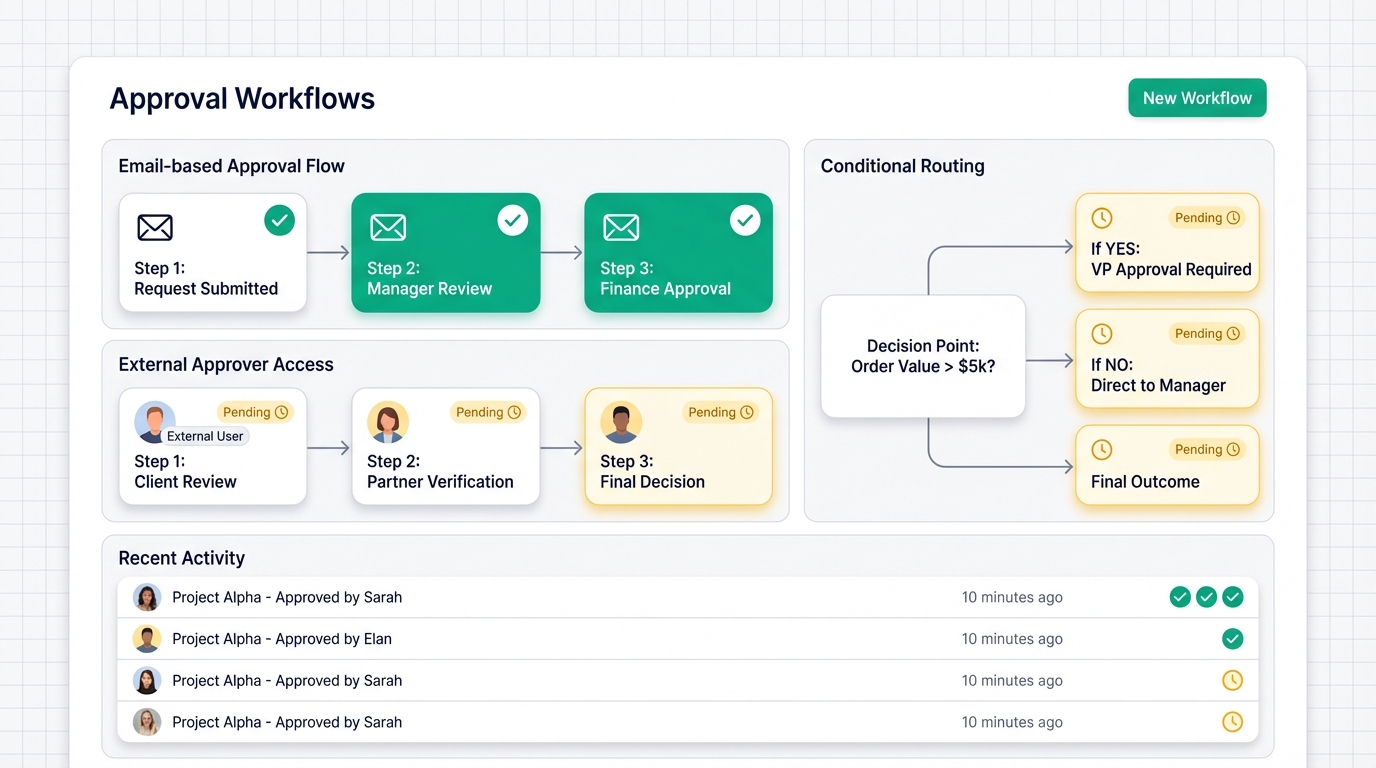
Small businesses waste countless hours on manual approval processes. Requests get buried in email chains. Decisions stall because the right person is out of office. And when you finally investigate enterprise approval tools, you find price tags designed for Fortune 500 companies.
Here's the reality: approval workflow software isn't just for large enterprises. SMBs face unique challenges that require specialized solutions—not scaled-down versions of complex enterprise platforms.
This comprehensive buyer's guide will help small business owners identify the right approval workflow software by focusing on SMB-specific features, transparent pricing, and practical implementation strategies. By the end, you'll know exactly what to look for and how to evaluate your options.
Why Small Businesses Need Specialized Approval Workflow Software
Small businesses operate differently than enterprises. The approval challenges you face require solutions built for your reality—not software designed for organizations with dedicated IT departments and unlimited budgets.
The SMB Approval Challenge: Limited Resources, Big Impact
In a small business, your office manager might handle purchase approvals, time-off requests, and vendor contracts. Your finance person reviews expenses while also managing payroll. Everyone wears multiple hats.
This creates unique small business approval challenges:
Small teams handle multiple approval types with limited personnel. When one person manages five different approval processes, they need a single dashboard—not five different tools.
Budget constraints preventing investment in enterprise-grade solutions. You need affordable BPM tools that deliver value on day one, not six months into a complex implementation.
Need for flexibility without complex configuration requirements. SMB workflow management should adapt to how you already work. If your process changes, you shouldn't need a consultant to update your software.
Importance of quick ROI and immediate productivity gains. Every hour spent configuring software is an hour not spent on revenue-generating activities. The best tools pay for themselves within weeks, not years.
With limited resources, every approval delay hits harder. A stuck purchase order might mean missed inventory. A delayed contract approval could cost you a client. Small businesses need approval automation that works immediately.
Where Enterprise Tools Fail Small Businesses
Enterprise approval platforms weren't built with your needs in mind. Here's where they typically miss the mark:
Per-seat pricing models that become prohibitively expensive. Enterprise tools often charge $15-30 per user per month. With 50 employees, that's $9,000-18,000 annually—before adding external approvers or seasonal staff. For many SMBs, that's their entire software budget.
Looking for a Kissflow alternative for SMBs? The pricing structure matters as much as the features.
Overly complex features that small teams don't need. Enterprise platforms include features for compliance scenarios you'll never face and integrations with systems you'll never use. This complexity creates confusion and slows adoption.
Implementation timelines that stretch for months. When enterprise vendors quote "8-12 weeks for full deployment," they're not accounting for your reality. You need approvals working next week, not next quarter.
Hidden costs for training and ongoing support. The sticker price is just the beginning. Enterprise tools often require expensive onboarding sessions, ongoing training subscriptions, and premium support tiers to actually use what you paid for.
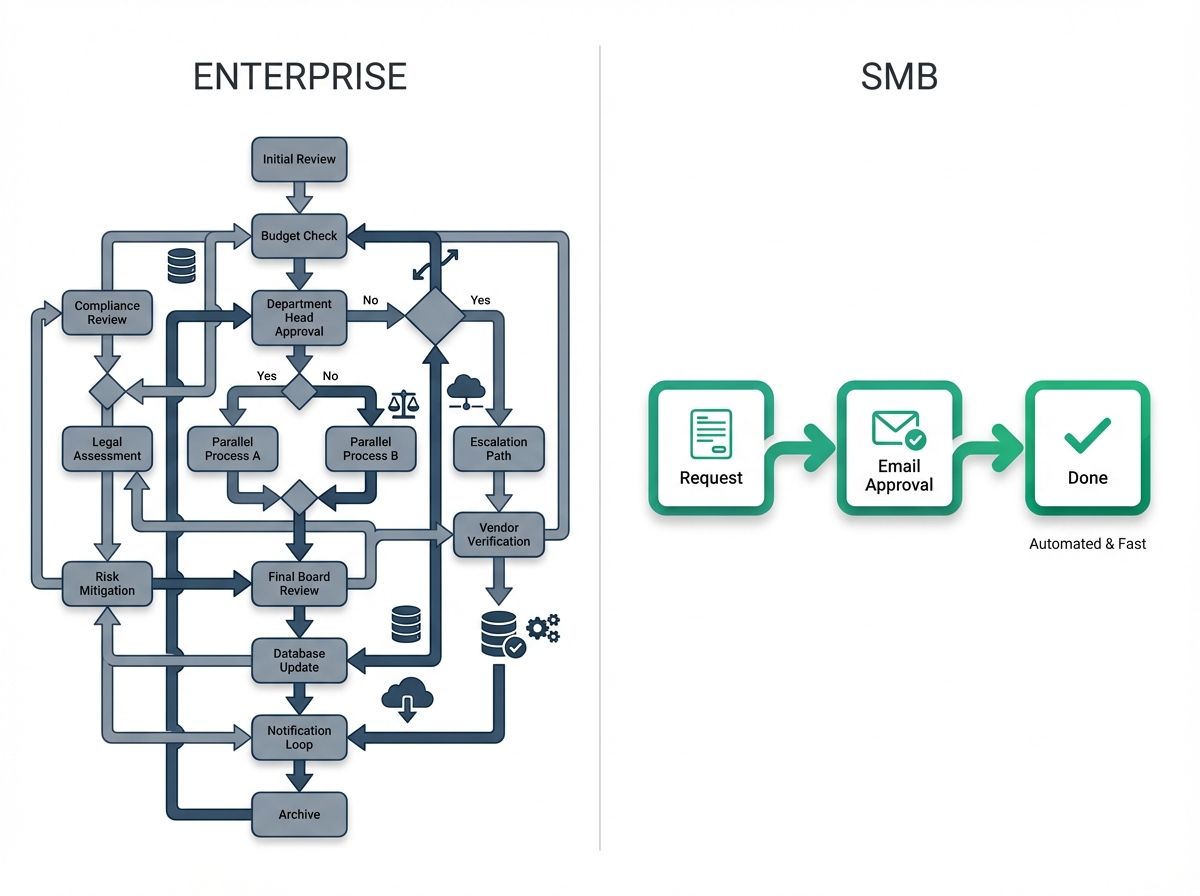
The enterprise vs. SMB comparison comes down to this: enterprise tools optimize for edge cases and compliance checkboxes. SMB tools should optimize for getting work done quickly.
The Real Cost of Manual Approval Processes
Sticking with manual approvals might seem free, but the hidden costs add up fast.
Time wasted chasing approvals via email and chat. Research shows the average employee spends 28% of their workday on email. When approvals live in email, finding the right message, forwarding to the right person, and tracking status eats hours every week.
Lost opportunities due to delayed decisions. When a vendor discount expires because nobody approved the PO in time, or a candidate accepts another offer while your hiring approval sits in someone's inbox—those costs don't show up on a balance sheet, but they're real.
Compliance risks from inconsistent approval trails. If you can't prove who approved what and when, you're exposed. Auditors don't accept "I think Sarah approved that over Slack" as documentation.
Employee frustration and reduced productivity. Manual approval processes create friction. When employees learn that getting approval is painful, they either skip the process entirely (creating risk) or waste energy navigating bureaucracy instead of doing their jobs.
The manual approval costs aren't just financial—they affect morale, compliance, and your ability to move quickly. Approval workflow automation pays dividends across all three dimensions.
Essential Features for Small Business Approval Software
Not all approval features matter equally for SMBs. Here's what actually moves the needle for growing businesses.
External Approver Workflows: Working with Clients, Vendors, and Contractors
Small businesses rarely operate in isolation. You work with vendors who need to approve quotes. Clients who sign off on deliverables. Contractors who approve their own time entries.
Why external approver workflows are critical for SMBs working with partners: Unlike enterprises with everything in-house, SMBs constantly loop in outside stakeholders. Your approval tool needs to accommodate this reality without creating friction.
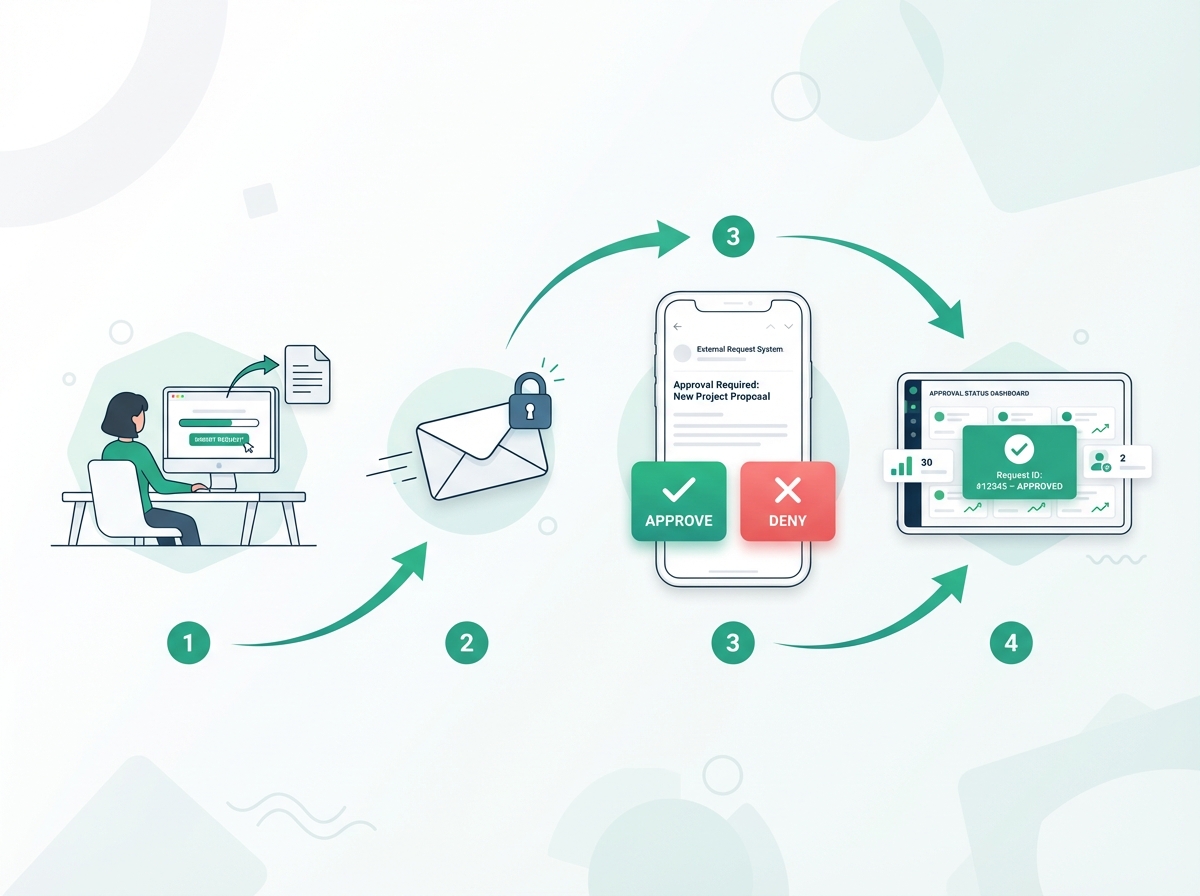
Secure signed URL access for non-account holders. External approvers shouldn't need to create accounts, remember passwords, or navigate your internal systems. They should click a secure link, see what needs approval, and respond—done.
Email-based approval systems that don't require platform logins. When you send a vendor a contract approval, they should be able to approve directly from their email. One click. No login screen. No learning curve.
Maintaining control and audit trails with external participants. Just because approvers are external doesn't mean you sacrifice visibility. Every client approval workflow should capture who approved, when, and from where—regardless of whether they have an account.
External approver success depends on removing barriers. If your vendor approval processes require external parties to jump through hoops, they'll delay—or you'll end up doing approvals over email anyway, defeating the purpose.
Email-Based Approval Systems: Simplicity Meets Efficiency
Email remains the universal business communication tool. The best approval software works with email, not against it.
One-click email approvals for instant decision-making. Approvers receive an email with Approve and Deny buttons embedded directly in the message. Click once, decision recorded, workflow advances. No login required.
Email-to-workflow submission for easy request creation. Forward an invoice to your approval email address, and it becomes a trackable approval request. CC the approval system on vendor communications to automatically create workflows.
Reducing friction for non-technical team members. Your senior approvers shouldn't need software training. If they can click a button in an email, they can use the system.
Mobile-friendly approval processes via email. Email works everywhere—on phones, tablets, and desktop. A simple approval workflow via email means approvers can clear their queue from anywhere without downloading apps or remembering URLs.
Email-based approvals remove the biggest adoption barrier: getting people to actually use the system. When approval is as easy as responding to email, compliance skyrockets.
Transparent Pricing Without Per-Seat Fees
Pricing complexity kills SMB software adoption. You need to know what you'll pay—this month and next year.
The problem with per-user pricing for small teams. Per-seat models punish you for involving the right people. Need to add your accountant as an approver? That's another seat. External client needs access? Premium tier required.
Flat-rate or usage-based SMB pricing models that scale with growth. The best affordable approval software offers pricing without per-seat fees. You pay for the capability, not for each person who touches the system.
Predictable costs for budget-conscious businesses. When pricing changes every time you add a team member, budgeting becomes impossible. Fixed monthly costs let you plan ahead.
Including all essential features without hidden add-ons. Watch for vendors who advertise a low base price but charge extra for email notifications, external approvers, or basic reporting. The sticker price should be the real price.
No per-seat fees means unlimited approvers at no extra cost. Add external vendors, contractors, and clients without watching your bill climb.
Quick Implementation and Easy Configuration
Time-to-value matters more than feature count. A tool with 100 features you can't configure is worth less than one with 20 features working on day one.
Visual workflow builders that don't require technical expertise. Drag-and-drop interfaces let business users create approval flows without writing code or submitting IT tickets. See your workflow as a visual map, not a configuration spreadsheet.
Pre-built templates for common SMB approval processes. Don't start from scratch. Approval workflow templates for expense reports, POs, time-off requests, and contract approvals get you running in minutes.
Minimal training requirements for team adoption. If your team needs a manual to submit requests, adoption will lag. The best easy implementation experiences feel intuitive from the first click.
Self-service SMB configuration without IT support. Small businesses often lack dedicated IT staff. Your approval tool should be something the office manager can configure during lunch—not a project requiring outside consultants.
A visual workflow builder transforms setup from a technical project into a 15-minute task. See your approval chain, drag steps around, and go live immediately.
2026 Buyer's Guide: How to Evaluate Approval Workflow Software
With dozens of options on the market, you need a structured approach to find the right fit. Here's how to evaluate systematically.
Defining Your Approval Process Requirements
Before evaluating vendors, understand what you actually need.
Mapping current approval workflows and pain points. Document your existing processes. Where do approvals stall? Which processes generate the most complaints? Where have mistakes slipped through?
Identifying must-have vs. nice-to-have features. Create two lists. Must-haves are dealbreakers—features you cannot compromise on. Nice-to-haves would be great but aren't essential.
A typical SMB requirements list might include:
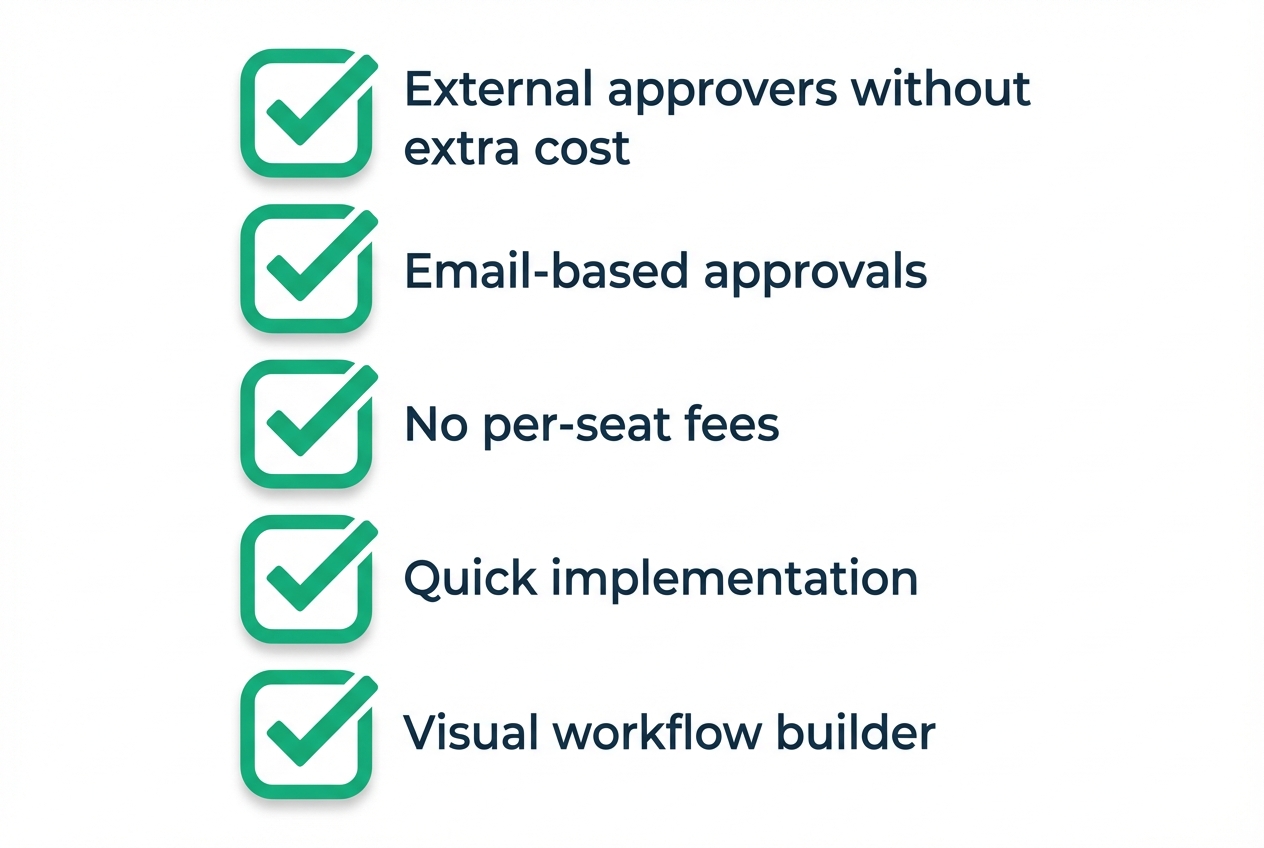
- Must-have: External approvers without extra cost
- Must-have: Email-based approval actions
- Nice-to-have: Slack integration
- Nice-to-have: Mobile app
Considering future growth and scalability needs. You might have 30 employees today but 100 in three years. How does pricing scale? Will features still fit your needs?
Involving key stakeholders in the evaluation process. Talk to frequent approvers and heavy requesters. Their daily experience matters more than executive wish lists.
Approval software evaluation starts with honest workflow assessment. You can't buy the right tool if you don't understand what's broken.
Comparing Enterprise vs. SMB-Focused Solutions
Not all approval software serves the same market. Understanding the difference saves time and money.
Feature comparison: What SMBs actually need vs. enterprise bloat. Enterprise tools include HIPAA compliance modules, SAP integrations, and multi-regional governance features. If you don't need them, you're paying for complexity that slows you down.
Looking for an affordable BPM tool as a Kissflow alternative for SMB use cases? Focus on core approval functionality, not compliance checkboxes you'll never use.
Pricing analysis: Total cost of ownership over 3 years. Calculate the real cost including:
- Base subscription
- Per-user fees
- Implementation costs
- Training costs
- Support tier requirements
- Integration add-ons
Implementation timeline: Weeks vs. months. Ask vendors directly: "How long from signing until our first workflow is live?" SMB-focused tools measure in days. Enterprise tools measure in months.
Support and training: Self-service vs. hand-holding. Enterprise tools often require expensive professional services. SMB tools should work out of the box with documentation you can follow independently.
The enterprise vs. SMB comparison comes down to whether you're paying for capabilities you'll use or features designed for someone else.
Budget Considerations and ROI Calculation
Approval software should pay for itself. Here's how to prove it.
Setting realistic budget expectations for approval software. SMB-appropriate approval software ranges from $20-150/month depending on usage. If you're quoted thousands monthly, you're looking at enterprise tools.
Calculating time savings and productivity gains. Track current approval times. If a purchase approval takes 3 days on average and software reduces it to 3 hours, multiply that time savings by your fully-loaded labor cost.
Example approval software ROI calculation:
- 50 approvals/month × 2 hours saved each = 100 hours saved
- 100 hours × $35/hour average cost = $3,500 monthly value
- Software cost: $50/month
- Net monthly savings: $3,450
Considering indirect benefits: compliance, audit trails, reduced errors. Not everything appears on a cost-benefit analysis spreadsheet. The value of a clean audit trail during tax season? The cost of a missed approval that delayed a client delivery? These matter.
Negotiating pricing and understanding contract terms. Ask about annual discounts, startup pricing, and what happens if you need to downgrade. Avoid multi-year commitments until you've proven the tool works for your team.
SMB budget planning for approval software should factor both hard cost savings and soft benefits like reduced frustration and better compliance.
Implementation Roadmap for Small Businesses
A phased approach reduces risk and accelerates adoption. Here's a practical timeline.
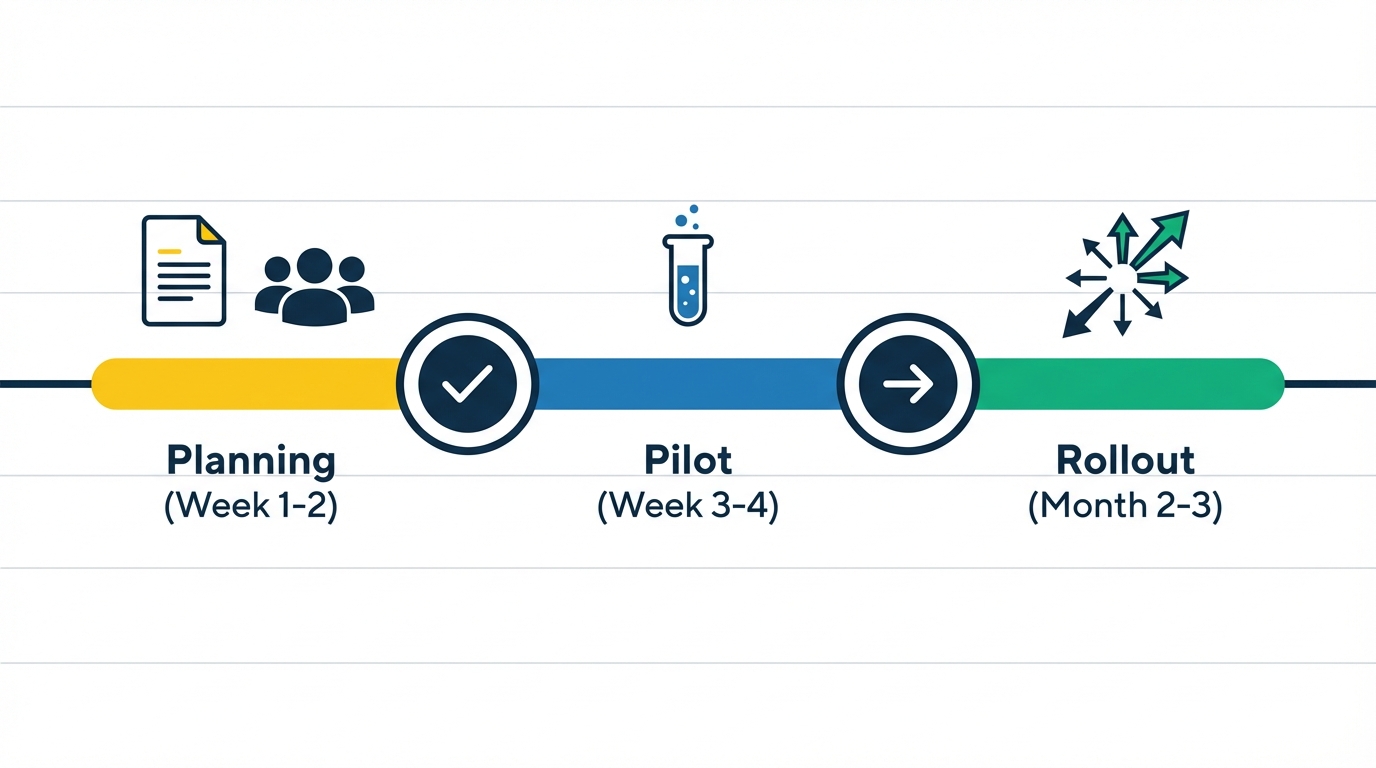
Phase 1: Planning and Preparation (Week 1-2)
Lay the foundation before going live.
Selecting pilot approval processes for initial implementation. Choose 1-2 workflows that are:
- High frequency (you'll see results quickly)
- Moderate complexity (not your most complicated process)
- Owned by early adopter team members (enthusiastic users)
Expense approvals and time-off requests make excellent pilots.
Identifying and training key users and champions. Find your power users—people who will learn the system deeply and help others. Usually 1-2 people per department.
Configuring basic workflows and approval chains through workflow configuration. Build your pilot workflows using templates as starting points. Define who approves what and under what conditions.
Setting up integration with existing tools (email, calendars). Connect email notifications, calendar integration for time-off visibility, and any communication tools your team already uses.
The SMB rollout plan starts small and focused. Success in one area builds momentum for broader adoption.
Phase 2: Pilot Launch and Testing (Week 3-4)
Test with real work before full deployment.
Running parallel processes during the pilot phase. Initially, run both old and new systems simultaneously. This catches gaps without blocking real work.
Gathering user feedback from early adopters. Ask pilot users specific questions:
- What's confusing?
- What's missing?
- What's faster than before?
- What's slower?
Adjusting workflows based on real-world usage through approval workflow testing. Real usage reveals edge cases you didn't anticipate. A pilot implementation surface issues while stakes are low.
Documenting best practices and common issues. Create simple guides for your team. "How to submit an expense report" and "What to do if an approval is stuck" solve 80% of questions.
Pilot launches generate user feedback that shapes the broader rollout. Don't skip this phase.
Phase 3: Full Rollout and Optimization (Month 2-3)
Expand systematically based on pilot learnings.
Expanding to additional departments and approval types during full rollout. Add one workflow category at a time: purchasing, then contracts, then HR processes. Each expansion is a mini-pilot.
Training remaining team members through team training sessions. By now, your champions can train their own teams. Peer training often works better than formal sessions.
Monitoring adoption and addressing resistance. Watch for teams reverting to email approvals. Address root causes: Is the system harder than email? Are approvers ignoring notifications?
Optimizing workflows based on performance data through workflow optimization. After a month of data, you can see bottlenecks. Which step takes longest? Who's the slowest approver? Use data to improve.
Implementation doesn't end at go-live. The first quarter is about optimization and adoption reinforcement.
Case Studies: SMB Success Stories with Approval Workflow Software
Real examples show what's possible. Here's how businesses like yours solved approval challenges.
Marketing Agency: Streamlining Client Approval Processes
Challenge: A 25-person marketing agency struggled with delayed client approvals causing project bottlenecks. Creative assets sat in email threads for days. Revision cycles dragged on because nobody could find the latest approved version.
Solution: The agency implemented external approver workflows with branded portals. Clients received clean, professional approval requests with clear Approve/Request Changes buttons. No client logins required—just click and respond.
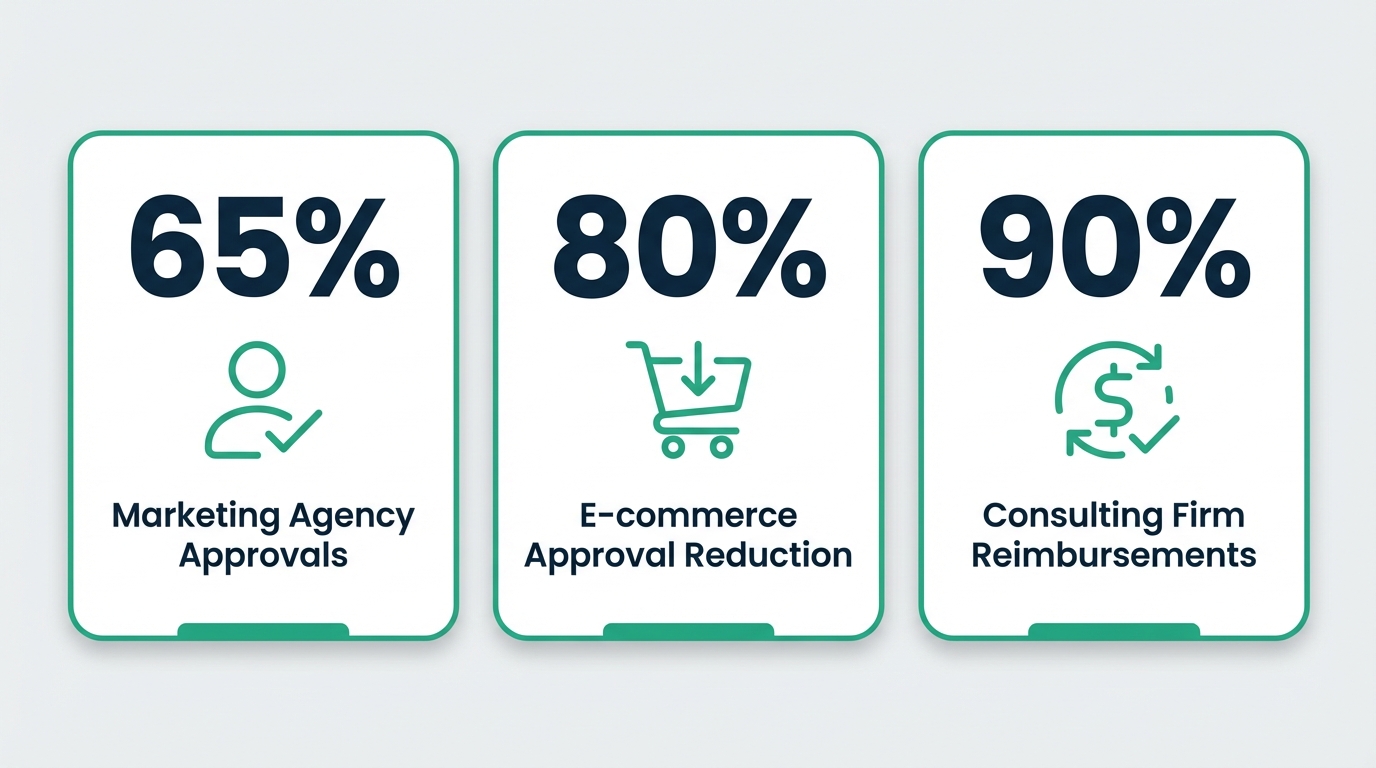
Results: 65% faster approval cycles. Client satisfaction improved because the process felt polished and professional. Project managers stopped spending hours chasing sign-offs.
Key takeaway from this agency approval workflow case study: External collaboration is critical for service businesses. If your revenue depends on client sign-offs, your external approver success depends on removing every barrier.
E-commerce Business: Automating Purchase Order Approvals
Challenge: A growing e-commerce company processed 200+ purchase orders monthly. Manual PO approvals caused inventory delays. Items went out of stock while approvals waited in email queues. Expedited shipping costs spiked because of poor planning visibility.
Solution: They implemented conditional routing based on amount thresholds. Orders under $500 auto-approved. Orders $500-5,000 went to the operations manager. Orders over $5,000 required executive approval.
Results: 80% reduction in approval time. Better inventory management because procurement could see approval pipeline. Expedited shipping costs dropped 40% with better planning visibility.
Key takeaway from this purchase order automation case study: Automated routing based on conditional routing rules saves time on routine decisions while maintaining controls where they matter.
Professional Services Firm: Simplifying Expense Reporting
Challenge: A 60-person consulting firm used paper expense reports. Receipts got lost. Employees waited weeks for reimbursement. Finance spent days each month manually processing reports.
Solution: They deployed a mobile approval system with phone-friendly expense forms. Employees photographed receipts immediately. Managers approved from their phones between meetings. Finance received clean, organized expense data.
Results: 90% faster reimbursement cycles. Complete audit trails with attached receipt images. Employee satisfaction improved—expense reporting went from dreaded chore to 5-minute task.
Key takeaway from this expense approval workflow case study: Mobile access is essential for remote and traveling teams. The audit trail benefits extend beyond speed to compliance and accuracy.
FAQ: Common Questions About Approval Workflow Software for SMBs
Small business owners ask these questions repeatedly. Here are direct answers.
Pricing and Budget Questions
How much should small businesses budget for approval software?
Expect $20-150/month for SMB-appropriate tools. If you're quoted $500+/month, you're either looking at enterprise tools or being overcharged. Affordable options exist without sacrificing essential functionality.
What's the difference between per-user and flat-rate approval software pricing?
Per-user charges you for every person who touches the system—requesters, approvers, administrators. Flat-rate charges a fixed fee regardless of users. For SMBs with many occasional approvers, flat-rate saves significantly.
Are there hidden costs we should watch out for?
Common surprises: premium support tiers, external approver add-ons, advanced reporting modules, integration fees, and training costs. Ask vendors: "What's included in the base price and what costs extra?"
Can we start with a free trial or basic plan?
Most SMB-focused tools offer free trials. Use the trial with real approvals—not just test data—to evaluate properly. Some offer limited free tiers for very small teams.
Implementation and Adoption Concerns
How long does implementation typically take for small businesses?
With SMB-focused tools: days to weeks, not months. A reasonable implementation timeline is first workflow live within a week, full rollout within 60 days.
What training is required for non-technical team members?
Minimal. Submitting a request should require zero training—forms should be self-explanatory. Approving via email requires no training at all. Admin configuration might need a 30-minute orientation.
How do we handle resistance to new processes as part of team adoption?
Common resistance sources: "Email works fine" (it doesn't), "I don't have time to learn new software" (this takes 5 minutes), "What if it breaks?" (pilot first). Address each specifically with evidence and peer champions.
Can we customize workflows as our business grows through workflow customization?
Yes—but evaluate how easy customization is during your trial. Can you add an approval step yourself? Change routing rules? The best tools make changes self-service.
Technical and Security Questions
Is our data secure with cloud-based approval software?
Reputable vendors use encryption in transit and at rest, secure data centers, and regular security audits. Ask about data protection certifications (SOC 2 is common) and data residency options.
How do external approvers access the system securely?
Through time-limited signed URLs that expire after use or after a set period. External approvers never get full system access—they see only the specific request they're approving.
What happens if the internet goes down?
Cloud-based approvals require connectivity. However, email-based approvals queue and process when connectivity returns. For high-stakes processes, have a documented manual fallback.
Can we integrate with our existing tools (QuickBooks, etc.)?
Most SMB approval tools offer integration options—native connections to common tools, Zapier for broader connectivity, or APIs for custom integration. Verify specific integrations during evaluation.
Conclusion
Choosing approval workflow software for your small business doesn't have to be complicated. Focus on what matters:
Small businesses need approval workflow software designed for their specific challenges—not scaled-down enterprise solutions. Enterprise tools charge enterprise prices for features you don't need while missing basics like easy external approver access.
Key differentiators include external approver workflows, email-based approvals, and transparent pricing without per-seat fees. These features address how SMBs actually work: with vendors, clients, and contractors who need easy access without accounts or training.
Successful implementation requires careful planning, phased rollout, and ongoing optimization based on user feedback. Start with one workflow, prove value, then expand. Don't try to automate everything on day one.
The right approval automation can deliver significant ROI through time savings, reduced errors, and improved compliance. According to CX Today research, 60% of organizations report achieving ROI within 12 months of workflow automation deployment, with productivity boosts of 25-30%.
Ready to streamline your small business approval processes? Start your free trial of ApproveThis today and experience how purpose-built approval workflow software can transform your operations. Set up your first workflow in 15 minutes, add unlimited approvers at no extra cost, and see why growing businesses choose simplicity over enterprise complexity.