Repeater Field
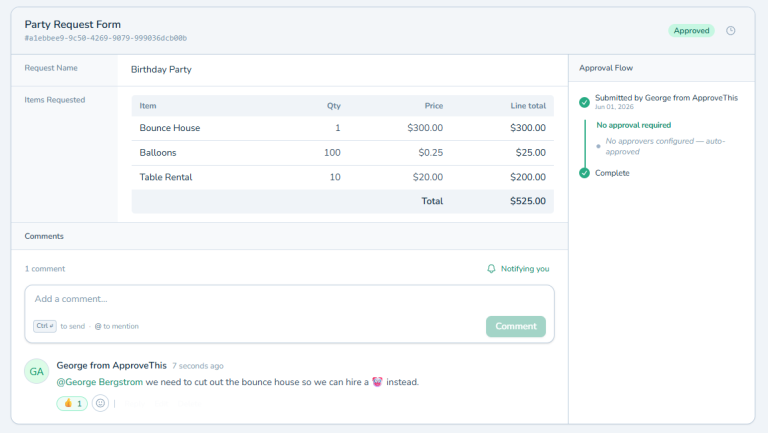
Repeater Field adds expandable sections to forms where users can enter multiple instances of the same data set. Create line item repeaters with fields for description, quantity, price. Requesters add as many line items as needed by clicking add another. Each line item captures complete information. Perfect for expense reports, purchase orders, multi-item approvals. Handle real-world approvals naturally instead of forcing single-item limitations. Eliminate multiple submissions for one logical approval. Maintain proper data structure and organization with each line item having proper fields.
Repeater Field: Add Multiple Line Items To Forms
One Item Per Request Doesn't Work
Someone needs to submit an expense report with five receipts. Or a purchase request for ten different items. But your form is built for one item. Now they're either cramming everything into one description field or submitting five separate approval requests for one expense report.
Neither option works. Cramming loses detail and makes approving difficult. Multiple submissions for one logical request creates chaos and wastes everyone's time.
You need forms that handle multiple line items naturally. Like every expense report or purchase order you've ever seen.
Repeater Field lets requesters add as many line items as needed. One expense report, multiple receipts. One purchase, multiple items. Add, remove, reorder. Build forms that match how work actually happens.
What is Repeater Field?
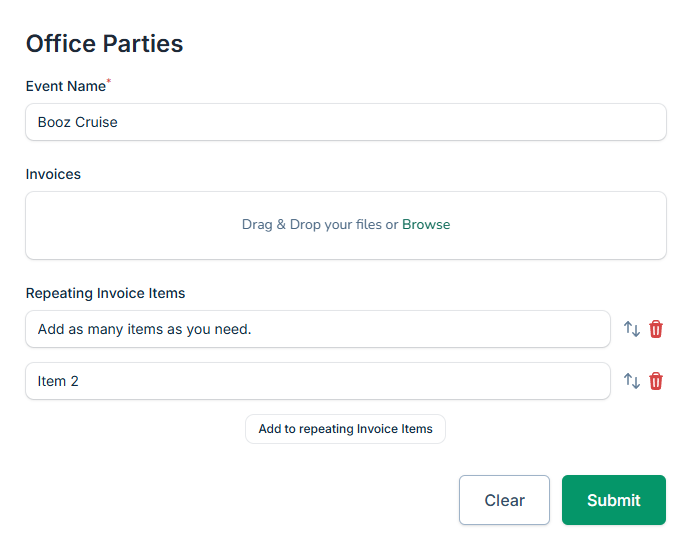
Repeater Field adds expandable sections to forms where users can enter multiple instances of the same data set. Create a line item repeater with fields for description, quantity, price. Requesters add as many line items as they need by clicking "add another."
Each line item captures complete information. Remove items that aren't needed. Reorder them if necessary. Everything submits together as one organized request with all line items included.
Perfect for expense reports, purchase orders, multi-item approvals, any workflow that naturally has multiple entries. Works with Calculated Field to sum totals across line items and Create Form to build sophisticated data collection.
Why Repeater Fields Matter
Static forms force workarounds. Repeater forms match reality.
Handle Real-World Approvals Naturally
Expense reports have multiple receipts. Purchase requests have multiple items. Travel approvals have multiple destinations. Repeater fields let forms match these realities instead of forcing people to work around single-item limitations. Submit one organized request with all the data.
Eliminate Multiple Submissions For One Approval
Stop approving five separate requests that all belong together. One expense report, one approval request, five line items captured cleanly. Approvers see the complete picture instead of piecing together fragments from multiple submissions.
Maintain Data Structure And Organization
Each line item has proper fields. Description, amount, date, whatever you need. Data stays organized and structured instead of being crammed into text boxes or split across multiple requests. Combined with View Approval Details, approvers review clean, organized information.
How It Works
Repeaters make forms flexible without complexity.
- Add Repeater Field: Create a repeater field in your form designer
- Define Line Item Fields: Set what fields appear in each repeatable instance
- Requesters Add Items: Users click "add another" for each line item they need
- Submit Together: All line items submit as one structured, organized request
Line items can include any field type. Text, numbers, dates, dropdowns, calculations. Build exactly the data structure your approval needs.
Perfect For Multi-Item Workflows
You need Repeater Field if you're dealing with:
- Expense reports with multiple purchases and receipts
- Purchase orders listing multiple items with quantities and prices
- Budget requests breaking down multiple cost categories
- Any approval that naturally contains multiple instances of similar data
Start Using Repeater Fields Today
Stop forcing multi-item approvals into single-item forms. Stop approving five requests that should be one.
Repeater Field lets forms handle multiple line items naturally. Add items, organize data, submit together. Forms that match how your approvals actually work.
Try ApproveThis free for 14 days and add repeater fields to your first approval form.