Manual Approval Follow-Up Automation: Operations Manager's Playbook

Every purchase order that sits in someone's inbox costs your organization an average of $506 in manual processing, follow-up emails, and error correction. Even more alarming: 52% of companies report missing critical deadlines because approval requests get lost in the shuffle.
If you're an Operations Manager spending hours each week chasing down approvals, you're not alone—and you're not powerless. Manual approval follow-up automation has become accessible to teams without dedicated IT resources, thanks to no-code tools that work where your team already works.
This playbook provides a tactical, step-by-step guide to automate approval follow-ups without IT department involvement, using no-code tools and proven implementation strategies. You'll walk away with assessment templates, implementation roadmaps, and the knowledge to cut your follow-up time dramatically—starting today.
The True Cost of Manual Approval Follow-Up
Before investing in any solution, you need to understand what manual approval processes actually cost your organization. The true impact goes far beyond the obvious time spent sending reminder emails.
Time and Productivity Drain: The Invisible Tax
Manual approval follow-up creates a productivity tax that compounds across your entire organization. The average Operations Manager spends 4-6 hours per week on approval-related activities: sending initial requests, following up on pending items, escalating overdue approvals, and tracking status across multiple channels.
This time investment becomes a bottleneck itself—but not the kind you want. When you're the bottleneck because you're manually managing every follow-up, strategic work suffers. Budget planning, process improvement, vendor negotiations—these high-value activities get pushed aside for the urgent task of chasing signatures.
The multiplier effect makes this worse: When you follow up with a department head, they stop what they're doing to respond. When approvals stall, downstream teams wait. A single delayed purchase approval can cascade into missed project deadlines, overtime costs, and frustrated employees. Research shows that organizations with manual approval processes experience significantly longer cycle times compared to those with automated workflows—Aberdeen Group found top performers achieve 8-day contract approval cycles versus 47 days for laggards.
Consider this: if your approval cycle takes an average of 5 days manually and you could reduce that to 1.5 days through automation, you're not just saving time—you're accelerating every process that depends on those approvals.
Error Rates and Compliance Gaps
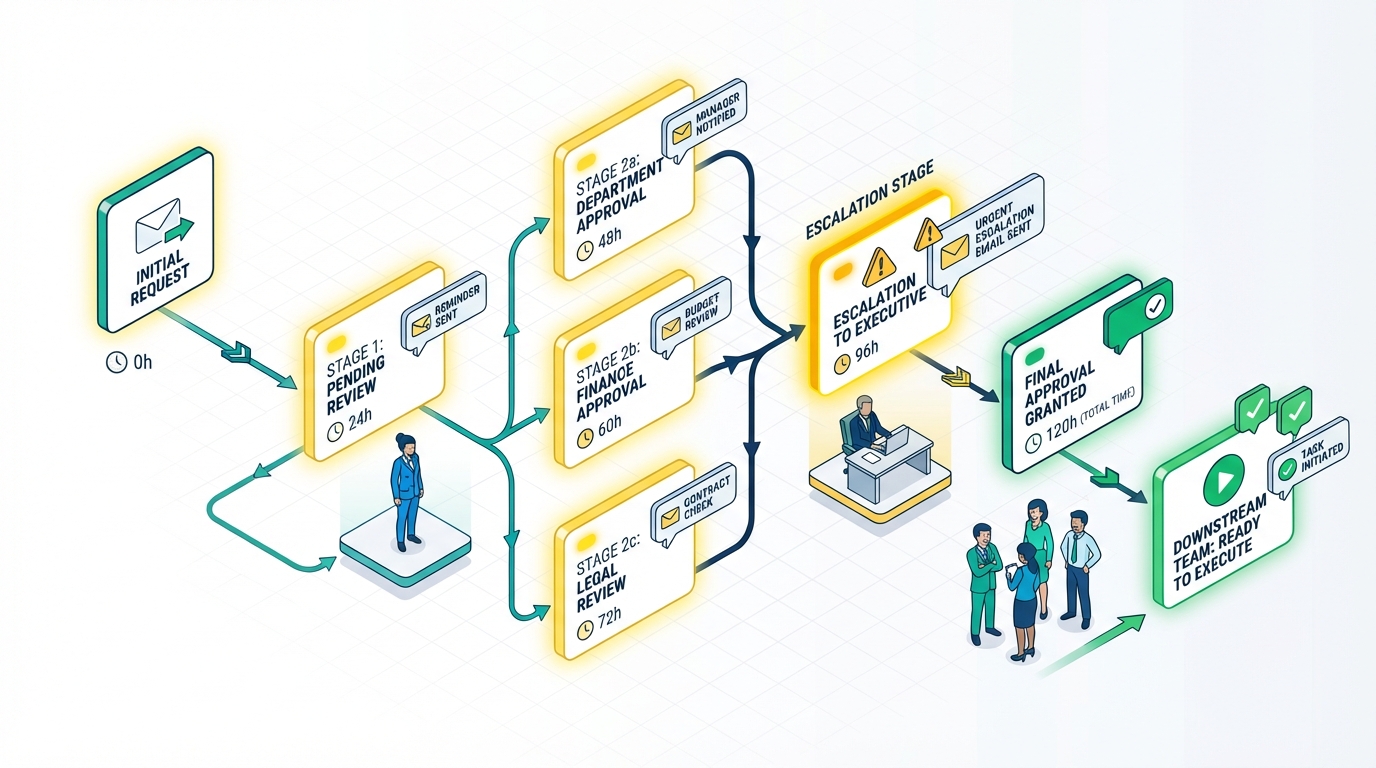
Manual tracking systems fail silently. When you're managing approvals through email threads and spreadsheets, errors accumulate in ways that don't become visible until audit time—or worse, until something goes wrong.
Common errors in manual tracking include:
- Version confusion: Multiple people updating the same spreadsheet creates conflicting records
- Lost requests: Emails buried in inboxes or filtered to spam folders disappear entirely
- Incomplete approvals: Multi-step processes stall when someone forgets to forward to the next approver
- Wrong approver routing: Manual routing means high-value requests sometimes bypass necessary oversight
The audit trail problem with email approvals is particularly acute. When auditors ask "who approved this $50,000 purchase six months ago," your email search bar isn't a compliant answer. Email lacks the immutable timestamps, IP logging, and sequential documentation that regulatory compliance requires.
For organizations in regulated industries—healthcare, finance, government contracting—this approval workflow chaos creates real legal exposure. HIPAA, SOX, and other frameworks require documented approval chains with clear accountability. Spreadsheets and email threads don't meet that bar.
Current State Assessment Template
Before implementing any automation solution, you need to quantify your current costs. This assessment will help you identify your most problematic approval types and build the business case for change.
Step 1: Measure Your Approval Cycle Times
For each approval type (purchase requests, expense reports, vendor contracts, etc.), track:
- Average time from submission to final approval
- Number of follow-up touchpoints required
- Percentage of requests that miss their deadline
- Time spent weekly on follow-up activities
Step 2: Identify Your Approval Bottlenecks
Map where requests stall most frequently:
- Which approvers have the longest response times?
- At what dollar thresholds do delays increase?
- Are certain request types consistently problematic?
- When in the month/quarter do backlogs form?
Step 3: Calculate Your Hidden Costs
Factor in the downstream impacts:
- Project delays caused by approval wait times
- Rush shipping or expedited processing fees
- Staff overtime to meet delayed deadlines
- Vendor relationship strain from payment delays
If you're tracking approvals in a spreadsheet now, this assessment will reveal how much that "free" solution actually costs.
Key Components of Approval Follow-Up Automation
Effective approval follow-up automation requires more than just sending automatic reminders. Understanding the essential components will help you evaluate tools and build workflows that actually solve your problems.
Notification Systems: Beyond Basic Emails
The foundation of follow-up automation is a notification system that reaches approvers where they work. Email approval problems—messages that get buried, filtered, or ignored—don't disappear just because those emails are automated.
An effective notification strategy uses multiple channels:
Email notifications remain the baseline, but effective systems make them actionable. Look for tools that include one-click approval buttons directly in the email, eliminating the need for approvers to log into separate systems. This single change can reduce response times by 40% or more.
Slack and Teams integration meets approvers where they already spend their day. When approval requests appear as interactive messages in communication tools, response rates increase dramatically. Approvers can approval context and make decisions without context-switching.
SMS alerts for urgent or escalated items cut through notification fatigue. Reserve text messages for time-sensitive approvals or items that have exceeded their deadline, and you'll get faster responses on the requests that matter most.
The key is custom notification settings that let you control timing and frequency. Immediate notifications for high-priority items, daily digest summaries for routine approvals, and escalating reminder sequences for overdue requests create a system that's persistent without being annoying.
Escalation Rules and Workflow Triggers
Automated notifications only work if they escalate appropriately when initial attempts fail. Your approval bottleneck solutions need teeth.
Time-based escalation is the most straightforward approach. If an approver hasn't responded within 24 hours, send a reminder. At 48 hours, add their manager to the notification. At 72 hours, escalate to a backup approver or department head. The specific intervals depend on your business needs, but the principle is universal: unanswered requests should automatically get more attention.
Priority-based routing ensures urgent requests don't wait in the same queue as routine ones. Conditional threshold routing allows high-value or time-sensitive items to bypass normal queues and reach senior approvers immediately. A $500 office supply order can follow standard routing; a $50,000 equipment purchase should take the express lane.
Conditional escalation paths add flexibility. If a primary approver is on vacation, route automatically to their delegate. If an approval requires multiple sign-offs, notify the next approver only after the previous step completes. If a request gets denied, route it back to the requester with clear explanation.
These rules should be configurable without coding. If you need IT help to adjust an escalation threshold or add a new approver, you've traded one bottleneck for another.
Tool Evaluation Checklist
When evaluating no-code automation tools for approval follow-up, prioritize these capabilities:
Essential Features:
- Visual workflow builder for creating approval sequences without coding
- Multi-channel notifications (email, Slack/Teams, mobile)
- Automatic reminders with configurable timing
- Escalation rules based on time and conditions
- One-click approval from email notifications
- Activity logging for audit trails
- Dashboard for tracking pending approvals
No-Code vs. Low-Code Considerations:
- Can non-technical users create and modify workflows?
- Does the interface use drag-and-drop or require formula knowledge?
- Are templates available for common approval types?
- Can you test workflows before activating them?
Integration Requirements:
- Does it connect to your existing systems (CRM, ERP, accounting)?
- Is Zapier or webhook support available for custom connections?
- Can it pull approver information from your current tools?
- Does it work with your team's communication platforms?
Step-by-Step Implementation Without IT Resources
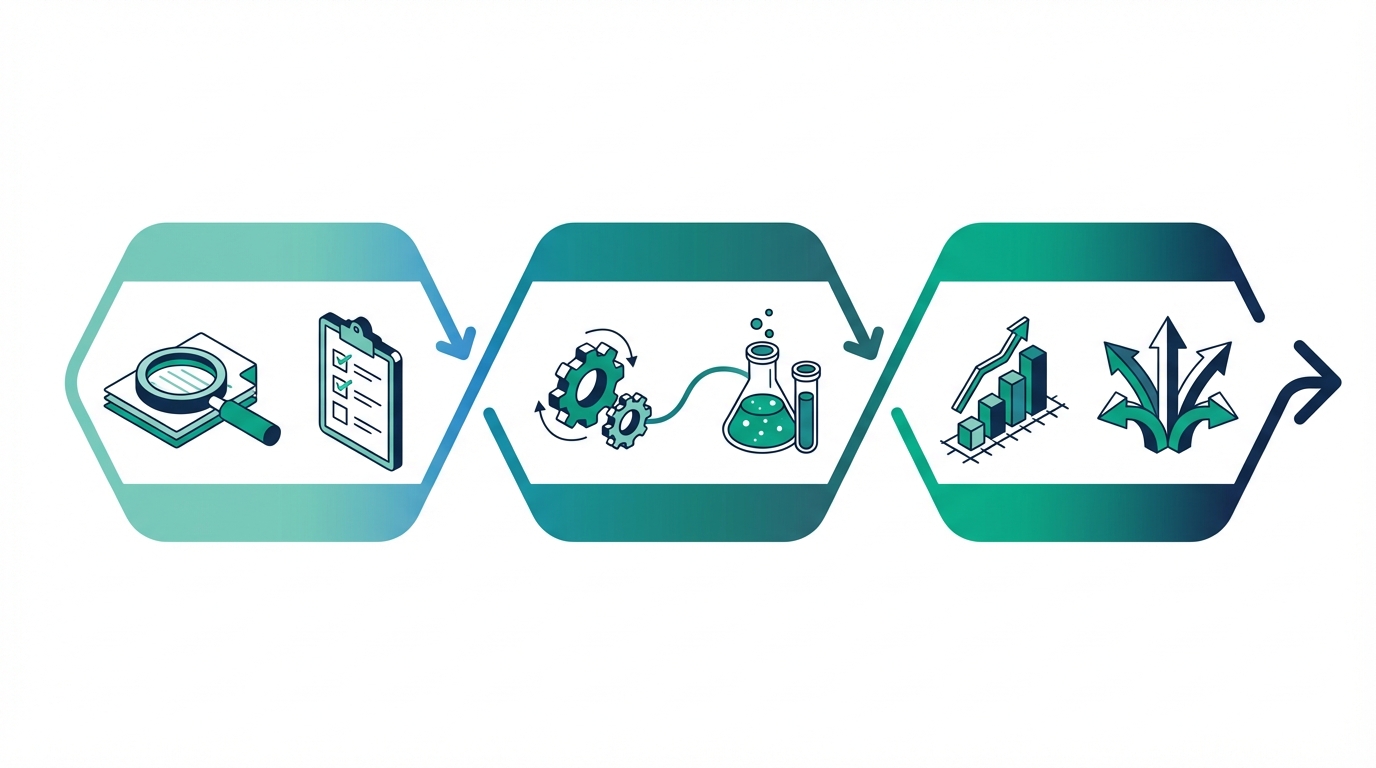
Moving from manual to automated approval follow-up doesn't require a massive project or technical expertise. This roadmap breaks the transition into manageable phases that Operations Managers can execute independently.
30-60-90 Day Implementation Roadmap
Phase 1: Assessment and Tool Selection (Days 1-30)
Week 1-2: Complete your current state assessment. Document your most problematic approval types, measure cycle times, and calculate costs. This data will guide your tool selection and help you prioritize which workflows to automate first.
Week 3: Evaluate 3-4 no-code automation tools against your checklist. Request trials or demos, and specifically test creating a simple approval workflow yourself. If you can't figure it out in 30 minutes without help, the tool is too complex. For a detailed comparison of available options, check out our approval workflow software buyer's guide.
Week 4: Select your tool and define your pilot workflow. Choose a single approval type that's painful but not mission-critical—something like office supply requests or time-off approvals. This gives you room to learn without high stakes.
Phase 2: Pilot Program and Configuration (Days 31-60)
Week 5-6: Build your pilot workflow. Map out the approval steps, configure notifications and reminders, and set up escalation rules. Test the complete flow with a small group of approvers who understand they're helping you refine the process.
Week 7: Gather feedback and iterate. What's working? Where are people confused? Are notifications reaching approvers effectively? Adjust your configuration based on real usage.
Week 8: Expand the pilot to a full department. Continue monitoring and adjusting. By the end of this phase, your pilot workflow should be running smoothly with minimal manual intervention.
Phase 3: Full Rollout and Optimization (Days 61-90)
Week 9-10: Add your second and third approval workflows, applying lessons from the pilot. These should be your most painful manual processes—the ones consuming the most follow-up time.
Week 11: Connect integrations to reduce data entry. Link your approval tool to your existing systems so requests can flow automatically without duplicate entry.
Week 12: Document your processes, train remaining team members, and measure results. Compare your new metrics to your baseline assessment to quantify the improvement.
No-Code Tool Configuration Guide
Most no-code approval tools follow similar patterns. Here's a general walkthrough of the configuration process:
Building Your Workflow with a Visual Flow Builder
Start with the ApproveThis visual workflow builder or equivalent. You'll typically see a canvas where you can drag and drop elements:
- Add a trigger: What initiates the approval? (Form submission, email, Zapier webhook)
- Define approval steps: Who needs to approve, in what order?
- Set conditions: Should requests route differently based on amount, department, or other criteria?
- Configure actions: What happens when approved or denied?
Most builders use a flowchart-style interface. Draw lines between steps to define the sequence. Add decision diamonds for conditional routing. Group parallel approvers when any one of them can approve.
Setting Up Automated Notifications
Within each approval step, configure:
- Initial notification: How quickly after assignment, through which channels
- Reminder frequency: How often to follow up on pending items
- Escalation triggers: What happens if the deadline passes without response
- Completion notifications: Who to notify when approvals complete
Configuring Escalation Rules Without Coding
Escalation typically works through simple "if-then" rules:
- If no response in 24 hours, then send reminder
- If no response in 48 hours, then notify manager
- If no response in 72 hours, then reassign to backup approver
Some tools let you create escalation tiers visually; others use form-based configuration. Either way, you shouldn't need to write code or formulas.
Integration with Existing Systems
Automation works best when it connects to your existing tools rather than creating another data silo.
Connecting to Email and Spreadsheets
If you're currently tracking approvals in a spreadsheet, most no-code tools can import that data to get you started. Google Sheets and Excel integrations let you automatically log approval decisions to your existing tracking system while you transition.
Email integration typically works through webhooks or dedicated email addresses. Forwarding an email to a workflow-specific address can automatically create an approval request, capturing attachments and key details.
CRM and ERP Integration Options
Native integrations vary by tool. Look for pre-built connections to your specific systems. For less common platforms, check whether the tool supports general API connections or has a connector library.
Zapier Integration for No-Code Automation
Zapier bridges almost any two systems without coding. You can:
- Create approval requests when records are added to your CRM
- Update your ERP when approvals complete
- Notify stakeholders in any tool when decisions are made
- Sync approval data to your reporting dashboard
The key is starting simple. Connect one integration at a time, verify it works, then add the next. Trying to automate everything at once creates complexity that's hard to debug.
No-Code and Low-Code Automation Tools Comparison
Choosing the right tool for your organization requires understanding how different platforms serve Operations Manager needs specifically—not just general automation capabilities.
Top 5 No-Code Tools for Operations Managers
ApproveThis
Purpose-built for approval workflows with specific features for follow-up automation. Key differentiators include one-click email approvals (approvers don't need accounts or logins), unlimited external approvers at no extra cost, and a visual flow builder designed for non-technical users. External approvers (vendors, clients) work without extra setup. Pricing starts at $19/month with all features included—no per-seat gotchas.
The platform handles the common Operations Manager pain points: vacation delegation automatically routes approvals when people are out, group-based approvers let any team member handle requests, and conditional threshold routing sends high-value items to senior approvers automatically.
Alternative Platform A: General Workflow Automation Tools
Platforms like Monday.com or Asana offer approval features as part of broader project management. They work well if you already use these tools and want approvals integrated into existing workflows. However, they're not optimized for approval-specific needs like escalation rules or audit trails.
Alternative Platform B: Form-Based Automation
Tools like JotForm or Typeform with approval add-ons provide simple request-and-approve workflows. Good for basic needs, but often lack sophisticated routing, escalation, or integration capabilities that Operations Managers require.
Alternative Platform C: Enterprise BPM Suites
Platforms like ServiceNow or Nintex offer comprehensive workflow automation but require IT implementation and typically cost $50,000+ annually. Overkill for most mid-market organizations and definitely not self-serve.
Alternative Platform D: No-Code Integration Platforms
Zapier and Make can build approval workflows by connecting multiple tools, but require more configuration effort and don't provide a unified approval dashboard. Best as a supplement to dedicated approval tools.
Pricing and Scalability Considerations
Look for plans that include unlimited approvers or don't charge for external users.
Feature Comparison Matrix
| Feature | Purpose-Built Approval Tools | General Workflow Tools | Enterprise BPM |
|---|---|---|---|
| One-click email approvals | Yes | Sometimes | Yes |
| No login required for approvers | Yes | Rarely | Configurable |
| Visual workflow builder | Yes | Yes | Yes |
| Escalation rules | Robust | Basic | Robust |
| Conditional routing | Yes | Limited | Yes |
| Multi-channel notifications | Yes | Varies | Yes |
| Activity logging/audit trail | Yes | Basic | Comprehensive |
| Vacation delegation | Yes | Rarely | Yes |
| Integration options | Zapier + native | Many native | API-heavy |
| Setup complexity | Self-serve | Self-serve | IT required |
| Typical cost | $20-100/month | $10-50/user/month | $50K+/year |
The tool evaluation checklist from earlier should guide your comparison. Prioritize the capabilities that address your specific pain points over feature counts that look impressive but don't serve your needs.
Real-World Case Studies
Manual approval follow-up automation delivers measurable results across industries. Here's what organizations similar to yours have achieved:
Operations Team Reducing Follow-Up Time by 70%
A 75-person manufacturing company was spending 8+ hours weekly chasing purchase order approvals across three departments. After implementing automated follow-up with escalation rules, weekly follow-up time dropped to under 2 hours. More importantly, approval cycle times fell from an average of 5.2 days to 1.8 days, accelerating procurement enough to avoid multiple rush shipping charges.
Finance Department Eliminating Approval Bottlenecks
A professional services firm's expense approval process required manual routing based on amount thresholds. The Finance Manager was the bottleneck, manually forwarding requests to appropriate approvers. After implementing conditional threshold routing, small expenses auto-approved, medium expenses went directly to department heads, and large expenses escalated to the CFO—all without manual intervention. The Finance Manager reclaimed 6 hours weekly for actual financial analysis.
Agency Streamlining Client Approval Processes
A marketing agency needed client sign-off on creative work but struggled with clients who didn't respond to emails. By implementing multi-channel notifications with SMS escalation for overdue items, client response rates improved from 65% within 48 hours to 94%. The agency reduced project delays by 40% and improved client satisfaction scores.
Measuring ROI and Success Metrics
Automating approval follow-up is an investment. Measuring results helps you optimize your workflows and justify expanded automation to stakeholders.
ROI Calculator and Metrics Dashboard
Calculating Your Automation ROI
Start with your baseline assessment data, then measure the same metrics after implementation:
- Time savings: (Hours spent on follow-up before - Hours spent after) × Hourly cost of your time
- Cycle time improvement: (Average days before - Average days after) × Value of faster approvals
- Error reduction: Number of approval errors before × Cost per error
- Compliance value: Risk reduction from proper audit trails (harder to quantify but real)
Key Performance Indicators to Track
Set up ongoing measurement using your tool's approval statistics and analytics:
- Approval cycle time: Average time from submission to final decision
- First-response time: How quickly approvers acknowledge requests
- Escalation rate: Percentage of requests requiring escalation
- On-time completion: Percentage of approvals meeting their deadline
- Approver response patterns: Which approvers need more reminders
Monthly Reporting Framework
Create a simple monthly report covering:
- Total requests processed
- Average cycle time vs. target
- Escalation rate and top escalation reasons
- Time saved compared to manual baseline
- Issues identified and improvements made
Success Metrics for Operations Teams
Approval Cycle Time Reduction Targets
Most organizations should target 50-70% reduction in approval cycle time within 90 days of implementation. If you're starting from 5-day average cycles, a target of 1.5-2 days is realistic.
Error Rate Improvement Benchmarks
Manual approval processes typically have 5-15% error rates (wrong approver, missing documentation, incorrect routing). Automated workflows should reduce this to under 2% through validation rules and consistent routing.
Team Productivity Metrics
Beyond approval-specific metrics, track broader productivity indicators:
- Time reclaimed for strategic work
- Reduction in "chasing" activities
- Improvement in downstream project timelines
- Decrease in expedited/rush requests
Executive Summary Template
Presenting Results to Leadership
When reporting to executives, lead with business outcomes, not feature descriptions:
"In Q3, we reduced approval cycle times by 62%—from 5.1 days to 1.9 days average—recovering an estimated $45,000 in avoided delays and expedited shipping. The Operations team reclaimed 24 hours monthly previously spent on manual follow-up, which we've redirected to vendor negotiation initiatives."
Quantifying Time and Cost Savings
Use concrete numbers:
- Hours saved per week × 52 weeks × Hourly rate = Annual time savings
- Avoided delays × Cost per delay = Direct cost savings
- Reduced errors × Cost per error = Error-related savings
- Compliance improvements = Risk reduction value
Building the Case for Expansion
Once you've proven ROI on initial workflows, use those results to justify expanding automation to additional approval types. The same patterns that worked for purchase orders will work for expense reports, contract approvals, and other processes.
Common Pitfalls and Troubleshooting Guide
Even well-planned implementations encounter challenges. Knowing what to expect—and how to respond—keeps your automation project on track.
Implementation Challenges and Solutions
Resistance to Change
Some approvers will resist new systems, preferring familiar (if inefficient) email-based processes.
Solutions:
- Start with approvers who are already frustrated with the current process
- Emphasize that the new system reduces their work (one-click approvals vs. email replies)
- Show them the mobile-friendly interface for approving on the go
- Give resistant approvers extra support during the transition period
Technical Limitations Workarounds
You may discover that your chosen tool doesn't support a specific workflow pattern you need.
Solutions:
- Look for Zapier or webhook workarounds that extend functionality
- Simplify complex workflows into multiple simpler ones
- Contact the tool's support—they may have solutions you haven't discovered
- Accept that 80% automation is better than 0% while you find alternatives for edge cases
Budget and Resource Constraints
Not every organization can immediately invest in premium tools.
Solutions:
- Start with free trials to prove value before requesting budget
- Calculate ROI to demonstrate that the tool pays for itself
- Begin with one high-pain workflow to show quick wins
- Look for tools with flat-rate pricing that won't balloon as you scale
Troubleshooting Common Issues
Notification Delivery Problems
Symptoms: Approvers claim they never received notification emails.
Troubleshooting steps:
- Check spam/junk folders and whitelist the sending domain
- Verify email addresses are correct in user profiles
- Confirm notifications are enabled for the workflow and user
- Test with alternative notification channels (Slack, SMS)
- Review delivery logs if your tool provides them
Escalation Rule Failures
Symptoms: Overdue requests aren't escalating as configured.
Troubleshooting steps:
- Verify escalation rules are active (not just saved)
- Check that time zones are configured correctly
- Confirm escalation recipients have proper permissions
- Test with a deliberately overdue request to verify rule triggers
- Review workflow logs to see if escalation attempted but failed
Integration Connection Issues
Symptoms: Data isn't flowing between your approval tool and connected systems.
Troubleshooting steps:
- Check that authentication tokens haven't expired
- Verify API rate limits haven't been exceeded
- Test the integration with simple data to isolate the problem
- Review webhook logs for error messages
- Reconnect the integration from scratch if other steps fail
FAQs for Common Objections
"What about security and compliance concerns?"
Reputable approval tools provide better security than email and spreadsheets. Look for:
- Activity logging that creates immutable audit trails
- Role-based permissions that control who can see and approve what
- Two-factor authentication for sensitive workflows
- Data encryption at rest and in transit
- Compliance certifications relevant to your industry
The audit trail alone typically exceeds compliance requirements that email cannot meet.
"How do you handle complex approval chains?"
Modern no-code tools support:
- Sequential approvals (one after another)
- Parallel approvals (multiple people simultaneously)
- Conditional routing (different paths based on criteria)
- Group approvals (any member of a team can approve)
- Unanimous requirements (all must approve)
If your approval chain is too complex to map in these patterns, it may be a sign that your process itself needs simplification.
"What about exceptions and edge cases?"
No system handles 100% of scenarios automatically. Plan for exceptions:
- Build manual override capabilities into workflows
- Create escalation paths for unusual situations
- Document the process for handling true edge cases outside the system
- Review exception frequency quarterly—common exceptions should become automated rules
Conclusion
Manual approval follow-up costs organizations significant time and money through hidden productivity drains. The $506 average cost per purchase order and 52% deadline miss rate aren't inevitable—they're symptoms of processes that haven't been updated for modern work.
No-code automation tools enable Operations Managers to implement approval bottleneck solutions without IT department involvement. You don't need enterprise software, technical skills, or a six-month implementation project. The right tool lets you build and deploy automated follow-up workflows in days, not months.
A structured 30-60-90 day implementation approach ensures successful adoption and measurable results. Start with assessment, pilot with a single workflow, then expand systematically. Each automated process frees up time for the next improvement.
Key success metrics include approval cycle time reduction (target 50-70%), error rate improvement (target under 2%), and team productivity gains (measured in hours reclaimed weekly). Track these from day one to quantify your ROI and build the case for expanded automation. According to recent research on workflow automation ROI, 60% of organizations achieve positive returns within 12 months of implementation.
Start your automation journey today by downloading our Current State Assessment Template and beginning to quantify your manual follow-up costs. The process of measuring your current state often reveals the urgency for change—and gives you the data you need to select the right solution and demonstrate results to stakeholders.